Google Shopping Date 04/01/2021
Google Pay Members: Spend $100+ at Lululemon Online, Get
$20.00
$100.00
Coupons Only
Google Pay via Google Pay App (Android or iOS) offers $20 Cashback when you Spend $100+ at Lululemon (online) using your Enrolled Card for the purchase (see the instructions below).
Deal Instructions
Deal Instructions
- Download Google Pay App (Android or iOS)
- Add Qualifying Payment Card to your Google Pay Account
- Follow On-screen Prompts and accept terms & conditions
- Swipe to "Explore" Tab in the App
- Scroll until you find the Lululemon offer
- Click to Activate the offer
- Click Enroll Card
- You may need to Click Activate again
- Spend $100 or more at Lululemon.com using the payment card enrolled at Google Pay
- Once the Reward is Earned, it will be deposited to "Your Money" in Google Pay.
- You may redeem the cash back reward 30 days after your qualifying purchase.
Just one click to apply all Google Shopping coupons and activate Coupons Only.
Get the free MaxRebates Extension. Browser Extension Terms & Conditions
You Might Also Like
9%Max Cash Back

Home Depot: Free Delivery by Christmas. Over 2 Million Online Items Eligible
Limitied Time Only
36%Max Cash Back

TEMU: Black Friday Encore
Up to 90% OFF
36%Max Cash Back

TEMU: Christmas Sale is on
Up to 70% OFF
3.6%Max Cash Back

Bass Pro Shops: Deck Sale
Up to 45% OFF
36%Max Cash Back

TEMU: Cyber Monday Deal
Up to 90% OFF
3%Max Cash Back

Walmart: Alilo Pocket Bunny Portable Toddler Music Player for Ages 3-8
$49.99
$109.98
3%Max Cash Back

Walmart: Alilo Kids Toy Phone With Soft Silicone
$19.99
$39.98
3.6%Max Cash Back

Chewy: Up to 40% OFF Toys, Treats & More
Plus Buy 2, Get 3rd Free Selected




More Google Shopping Deals

Samsung Galaxy S23 Ultra
$599 (FOR GOOGLE FI USERS)
Nova Launcher Prime (Android App)
$0.49
$4.99
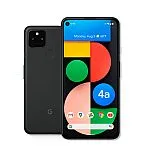
Google Pixel 4a Unlocked 128GB 5G Smartphone
$299 (New Customers) or $399 (existing customer)
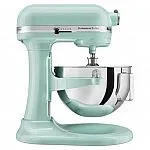
KitchenAid Pro 5 Plus 5-Quart Bowl-Lift Stand Mixer
$199.99








Deal Overview
MaxRebates offers you many different choices to save money from thousands of stores. New deals and coupon codes are constantly being updated on MaxRebates, with the latest one updated on December 18, 2025. Online shoppers can save even more by using a combination of cash back and deals whilst shopping at Google Shopping with MaxRebates.
Tips to save money with Google Pay Members: Spend $100+ at Lululemon Online, Get offer?
How do I know which website will take me to Google Pay Members: Spend $100+ at Lululemon Online, Get?
How can I keep track of information on Google Pay Members: Spend $100+ at Lululemon Online, Get?
What to search for to find coupon codes for Google Pay Members: Spend $100+ at Lululemon Online, Get?
Do I have to pay to get the coupon code for Google Pay Members: Spend $100+ at Lululemon Online, Get?
MAXREBATES EXTENSION

GET THE APP